
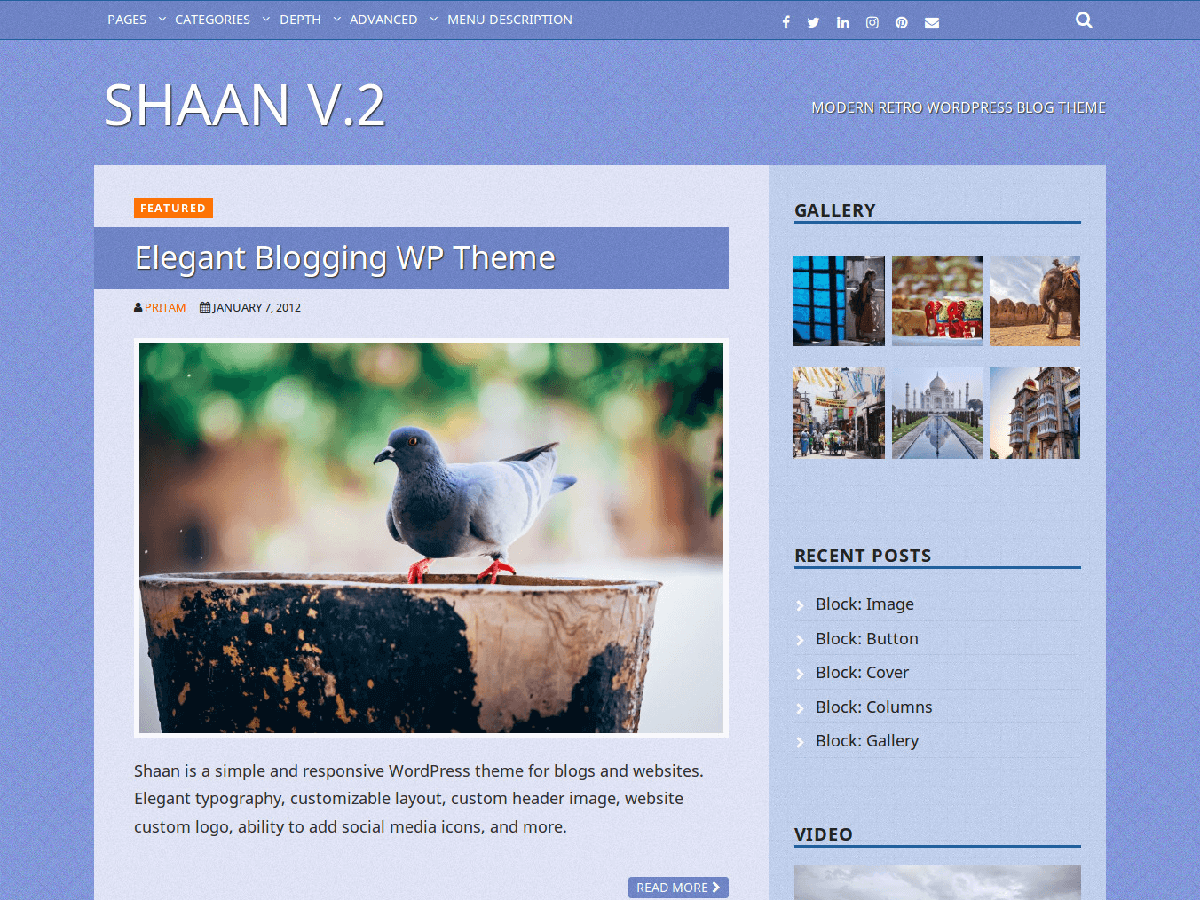
Shaan, or pride, is another free WordPress theme from Specky Geek workshop. This has been crafted with lots of care and emphasis on usability. The grunge background makes it a fantastic choice for personal or group blogs. It has in-built support for WP-Pagenavi navigation. You can easily add ads to header and posts. Also, easily add Facebook and Twitter URLs along with RSS feeds. Supports all major browsers and works fine in Internet Explorer 6 and above.
Features of Shaan WordPress theme:
- Custom background and header
- Clean typography
- Cufon font replacement
- Related posts
- Custom archives template
- Full-page template
- Attachment page for better image display
- Great support for images
- Theme options for easy customization
- Adsense ready
- Easily add Analytics codes
At present, the theme is available in only blue colour scheme. If it gets enough support (and some dollars as reward), I promise to add more colour schemes. Do send in your dollars using the PayPal option on Theme Options page or send it to pritam [at] speckygeek.com
Check out Shaan’s screenshots:
- Shaan WordPress Theme Homepage
- Shaan WordPress Theme Layout
- Shaan WordPress Theme Attachment Page
Cheap Web Hosting
Specky Geek brings to you YesRack.com for your website/blog hosting. Get cPanel Linux web hosting for as low as $0.625/month. Use the coupon code "25OFF" to get 25% discount on annual hosting packages. YesRack.com resells hosting of a top web host!


Hello, thanks for your nice template!
I would like to use it, but I have a little trouble with the language.
I’m italian and we use some accents letters like àèéòùì.
I can’t see them in the title with your template.
Please suggest me which line of the style sheet I have to modify to have a title font (suggest me one right font too) that is Italian compliant.
Thanks
Antonio SILVI
Hi Antonio, I would suggest you tun off the Cufon Font Replacement feature. You will have to delete the appropriate references in functions.php and footer.php. An ugly and inefficient method would be to delete the Cufon JavaScript files present in one of the folders. All the best.
PS: Do care to send some donation. You can also let me customize WordPress themes for you for a small fee.
Hey, Pritam, thats a great theme! Thanks & Congrats! I intend using it with some customisations. But I am looking for some documentation. For example, your features list is very interesting. But not sure where to find instructions – theme options do’t give details. Shall be grateful for your reply. Best regards.
Though there is no documentation for the theme, it should be fairly easy to use. The theme options page tells you about all the features. You just need to fill in the details or chose the right options. Nothing too complicated. If you need specific help, you can shoot me a mail.
Thanks. I will certainly make a contribution, once my website is done with this theme.
Specific issue:
I am having a hierarchy of sub-categories under categories. How to display these in an indented manner on sidebar – right now only first level categories are shown by default. I found a plugin, but it is not working with “shaan” (sidebar) template. Should I make any changes to “sidebar.php”? Thanks once again.
The sidebar does not alter the default settings of your widgets. So make sure to include the widgets with appropriate settings. You can of course hard-code the thing in sidebar.php, but that’s not recommended.
Pritam,
Thank you for the great theme! It looks nice and clean and it’s easy to use. I do have some questions. Can I remove “author, date and leave your comment” from the pages? I want the pages to look like pages, not posts. Also. the Archives Widget links only to the home page and I don’t know why.
Thanks,
Carl
Hi Carl, You will have to create a new page template which does away with the undesired elements. For the comments, you can turn them off from WordPress settings as well. When you say Archives Widget, do you mean the Archives page? Tks
Thanks, I’ll work on that.
Regarding “Archives Widget” I mean the widget in the side bar that allows someone to access the posts by month. Looks something like this.
Archives
March 2011
February 2011
January 2011
December 2010
November 2010
October 2010
Sorry, didn’t mean to put that link in there.
Is there a way to edit the php header code so the heading description doesn’t show up on every page when you have an image as the header?
I really like the template, but I just upgraded my browser to IE 9 and the site and post titles will not display. Do you have suggestions on what I could do?
I got a minor error prompt for Shaan theme.
Under IE 8.0, the error message says ‘Cufon’ undefined, line 279. Could you fix this?
Fixed the issue and updated the theme. Should be available in the WordPress repository in a couple of days. Thanks for alerting me.
Great theme, thank you for it. Still getting things setup and testing. One challenge I am having is turning off the read more so each post in a category is displayed in full as they have formatting such as bullet points. I have been unsuccessful in turning this off. Any ideas?
hi
I have installed the shaan theme , Is there any way to hid the tags under individual post. I just want the tags to be hidden and not removed
thanks
Bob
It sounds like a black-hat SEO trick. Not recommended at all.
nice theme. excellent option panel. The Administration Panel was going to make your own theme. Codes Can you help. Do you have the permit.
My English is not enough. sorry
Hi, Do you need creating theme options page for your own WordPress theme? Or, do you want to customize the existing theme? As of now, it is not clear to me. Do let me know so that I can help you better.
We would make administration panel as well, can we get some help with the codes? do you have permit to do that?
We will create our own theme. We were trying to create theme options page to our own page, then we saw your theme options page. Your theme options page is excellent for us. Would you let us use your codes and make changes on it and add on our theme?
Please feel free to use this WordPress theme options tutorial to create your own WordPress themes. All the best.
Hi,
I just changed over to the Shaan theem, and I love the look of it. However, is there a way to change the header font size? My name of Divine Balance Life Coaching is too long for the larger font. Currently it cuts off the word coaching. Also, I have a line underneath the title and tag ling. I want to get rid of this.
Thanks for your help.
The Shaan WordPress theme uses Cufon font replacement for some text fonts. You can make the desired changes by editing the Cufon customization file in the “Includes” folder. You can customize the look by editing the CSS file of the theme. You can learn about CSS on the Web.
Hi there,
I just went through the tutorial and looking at your code I think you should change this:

$file_dir = get_template_directory_uri();
to
$file_dir = get_stylesheet_directory_uri();
This does the same trick, but will make your theme options page work for people running Multisite installations
Thanks a lot for your tip.
Hi Pritam,
i love your theme, you are awesome. btw, just a little suggestion:
1. function css and javascript need to be loaded only on your option theme, not in all admin.
2. no update notification when saving theme option, you need to change
elseif ( isset ( $_REQUEST['save'] ) )to
elseif ( isset( $_GET['settings-updated'] ) )3. i think it’s better for feedburner redirect feature if you just filter wordpress rss link.
thank you for your great awesome theme and blog!
Thanks a lot, David. I will take care of your suggestions in the next update. Stay in touch.
Hi Pritam,
i really like your Theme. It´s a perfect Exmple for: Less is more
I also have a Suggestion or Feature request. I would like to Translate the Theme into my Native Language, German. I use the Plugin CodeStyling Localization but it didn´t work. They told me to add the following lines of Code:
/**
* Make theme available for translation
* Translations can be filed in the /languages/ directory
*/
load_theme_textdomain( ‘deinThemeName’, TEMPLATEPATH . ‘/languages’ );
$locale = get_locale();
$locale_file = TEMPLATEPATH . “/languages/$locale.php”;
if ( is_readable( $locale_file ) )
require_once( $locale_file );
to the functions.php to work properly but i dont know how. Could you Please do this ?
Greetings from Germany
Hi Xerxes, Glad to hear that you want to translate the theme. You can place the code anywhere in the functions.php file in the theme folder. Just don’t break any existing code. All the best.
my main photo doesnt show up half the time unless i go to next page, contact, then it shows up, then when i go back to home, the main photo shows. Why? What can I do to fix asap?
Hey Amy, Your site looks okay to me. The issue doesn’t sound like an error with the theme. It seems that your browser does not refresh the blog index page every time you visit it. Or, your Internet connection is slow, which means images take longer to load. Hope this is of some help. Thanks
Thanks for your awesome free WP template! It’s very easy on the eyes and has made my site look a LOT better.
Cheers,
Jeremy
I love your design and so does my client. The only issue that is that it is a small professional business. Any possibility in paying a fee to have the wordpress footer credits removed and the company copyright put in its place?
Hi JD, Thanks for your interest in the WP theme. I will be getting in touch with you via email. Thanks
Hi Specky Geek,
I am developing a website with your Shaan template. I would like to change the background color of the posts and sidebar. I’m having trouble locating that code. Can you help me?
Thanks.
You need to edit the style.css file of the theme template. Alternatively, just add the modified CSS code to the relevant textarea in ‘Theme Options’ page in the WP dashboard.
Hi, I was always very glad with your theme. But now I have big troubles, and can’t find the problem. The (Dutch) forum also can’t help me, it seems.
My screen layout is damaged. I think I did something very wrong, but can’t find the mistake. Is there a possibility that you can help me with that? The sidebar is also moved to the bottom of the startpage.
If you need to login to help, please let me know!
Best regards,
Ivonne
Hi Ivonne, You are using the theme on WordPress.com blog with a custom domain. So there is no way you can tamper with the theme files. The problem is due to wrong use of HTML codes in the post with the title “Het strand van Spanje”. Clean it up and you will be good to go again. Thanks
It helped!!! O, many many thanks, you saved my blog, because I wanted to stop with it! There was a newer revision, I choose “repair” and the problem solved itselfs!
Best regards, Ivonne
Hi -
I’m doing a job for a client who is using your theme and I have a question. I am porting her wordpress-hosted blog to a self-hosted blog.
Old site: http://birthmedia.wordpress.com/ (uses older version of Shaan)
New site: http://birth-media.com/
In the menu on the old site, the background is applied under all the menu li’s, but on the new site, it’s restricted to the top row. I’ve been trying to figure out which CSS element I should be targeting to get the background to “wrap” properly with the menu items, but I am a little lost. Any suggestions? Thanks, and great theme!
Nevermind, i figured it out. Here’s where the background image is applied for the menubar in the new version:
body{
background:url(‘images/nav-bg.jpg’) repeat-x 0 0;
}
I edited the image and… done! Thanks!
Hi,
I am using your wonderful Shaan theme. Just below every post it has a link “healinghamlet” that will take you to the author archives. This was not there before and I want to get rid of it but can’t. Please help. Thank you!
Hey Anita, The author name is part of the theme. If you don’t want that, the necessary theme files will have to be edited. Most probably, the code should be present in the functions.php file.
Hi! I really liked your WordPress theme is named Shaan. But I’m using them as it was under improvements by itself, it turns out that the elements with the sidebar move down into place between navigation and footer. Have you not noticed the error, I suspect that this is due to the fact that the sidebar is made dynamic and not limited to the location. Help fix it, please.